
Example solutions · Demonstrations
See a better way to work.
Illustrative applications with fictional records. These are examples of the problems we can help solve, not delivered customer projects or production software.
Try the field service demonstration →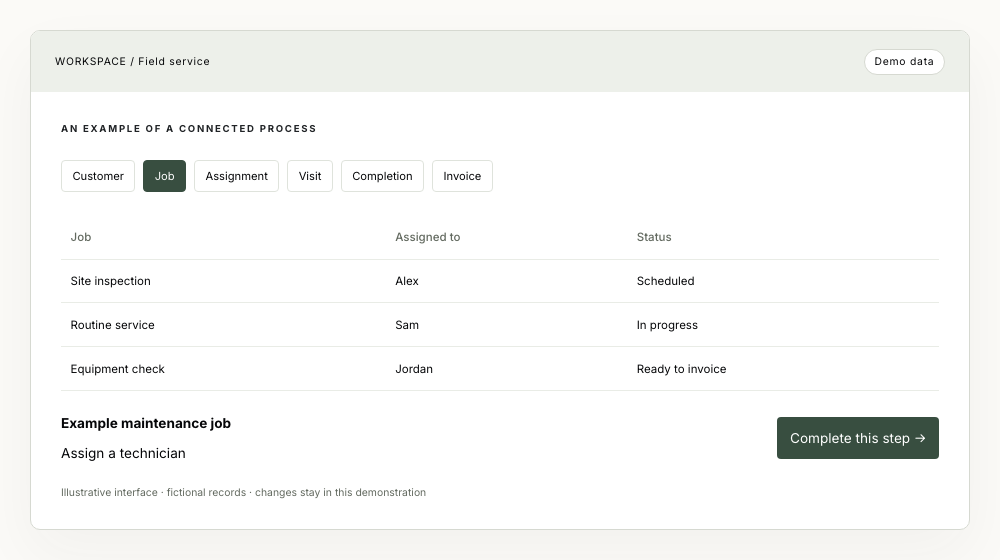
Recruitment
The problem
Candidate details, interviews and onboarding tasks live in different spreadsheets and inboxes.
A more connected process
Keep every placement connected to the people, decisions and tasks behind it. See what needs attention before a handover is missed.
Try completing the highlighted task to see the next action. This small demonstration illustrates a handover; it does not save records or connect to external systems.
Open this example →An example of a connected process
- Candidate
- Interview
- Placement
- Onboarding
- Invoice
| Candidate | Role | Next action |
|---|---|---|
| Alex Morgan | Operations manager | Confirm interview |
| Sam Taylor | Account manager | Prepare onboarding |
| Jordan Ellis | Team leader | Review application |
Confirm interview availability
Illustrative interface · fictional records · changes stay in this demonstration
Watch the short walkthrough
Silent walkthrough: Confirm interview availability. Completing this step moves the workflow forward to “Prepare placement details”. Reset returns to the original state. All records are fictional.
Field service
The problem
Job details arrive by email, schedules change by phone and completion records are hard to find.
A more connected process
Give the office and people in the field a shared job record, with a clear owner and the next action visible from booking to invoice.
Try completing the highlighted task to see the next action. This small demonstration illustrates a handover; it does not save records or connect to external systems.
Open this example →An example of a connected process
- Customer
- Job
- Assignment
- Visit
- Completion
- Invoice
| Job | Assigned to | Status |
|---|---|---|
| Site inspection | Alex | Scheduled |
| Routine service | Sam | In progress |
| Equipment check | Jordan | Ready to invoice |
Assign a technician
Illustrative interface · fictional records · changes stay in this demonstration
Watch the short walkthrough
Silent walkthrough: Assign a technician. Completing this step moves the workflow forward to “Confirm the visit time”. Reset returns to the original state. All records are fictional.
Professional services
The problem
Proposals, project progress and billing are tracked separately, making it difficult to know what is ready to invoice.
A more connected process
Connect the proposal to the project, its tasks and recorded time. Make the handover from delivery to billing easier to follow.
Try completing the highlighted task to see the next action. This small demonstration illustrates a handover; it does not save records or connect to external systems.
Open this example →An example of a connected process
- Lead
- Proposal
- Project
- Time / expenses
- Invoice
| Project | Owner | Next action |
|---|---|---|
| Process review | Alex | Approve proposal |
| Customer portal | Sam | Review milestone |
| Service redesign | Jordan | Prepare invoice |
Review the proposal
Illustrative interface · fictional records · changes stay in this demonstration
Watch the short walkthrough
Silent walkthrough: Review the proposal. Completing this step moves the workflow forward to “Set up project tasks”. Reset returns to the original state. All records are fictional.
A useful first conversation
What would you like to improve?
A 30-minute conversation about your business, the problem you are trying to solve and whether software or AI could help. No project specification needed.